
Esta página aún no está disponible en tu idioma.
FrameRef 1.0.1 release notes
Section titled “FrameRef 1.0.1 release notes”FrameRef 1.0.1 brings a refreshed UI, faster PDF handling, improved video workflows, and important stability improvements. This update refines the core experience while adding several highly requested features.
Downloading & installing
Section titled “Downloading & installing”Use the Check for Updates action in the Help menu, or download directly:
New features
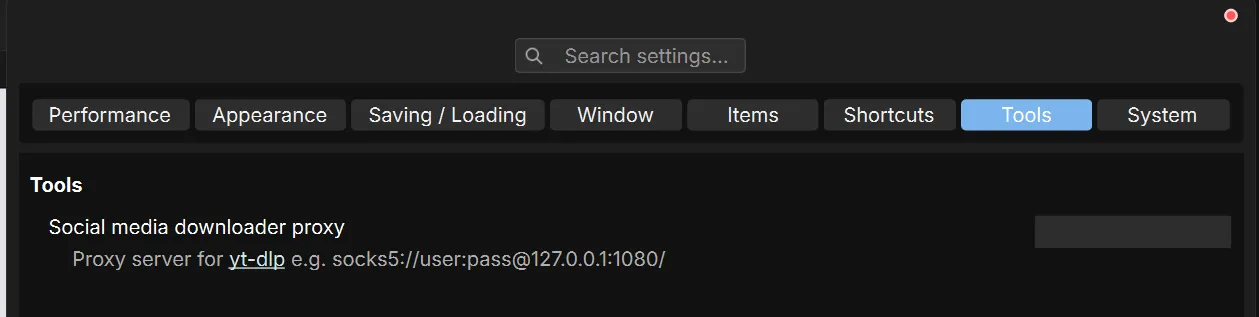
Section titled “New features”Expose proxy settings for Social Media Downloader
Section titled “Expose proxy settings for Social Media Downloader”You can now configure proxy settings directly for the downloader, improving compatibility in restricted networks and studio environments.
Audio output for video items
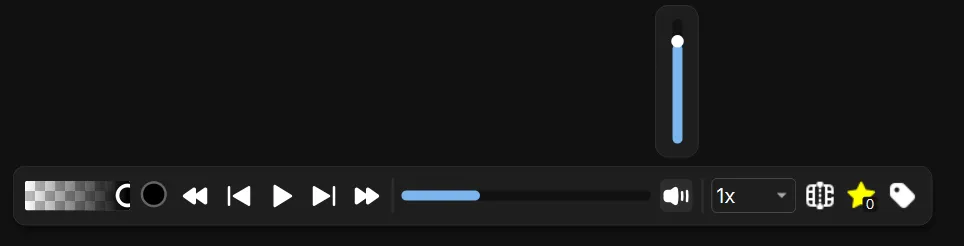
Section titled “Audio output for video items”Video items now support audio playback, making it easier to reference dialogue, timing, and sound-based cues directly inside your board.
Optional persistent top toolbar in Frameless Mode
Section titled “Optional persistent top toolbar in Frameless Mode”You can now choose to keep the top toolbar visible when using frameless mode, giving quicker access to tools without sacrificing layout flexibility.
Thin border option for media items
Section titled “Thin border option for media items”Added an option to display subtle borders around images, PDFs, GIFs, and videos, improving visibility on bright or similar-colored backgrounds.
PDF dynamic resolution (level of detail)
Section titled “PDF dynamic resolution (level of detail)”PDFs now use dynamic resolution rendering, improving clarity while optimizing performance depending on zoom level.
Keyboard shortcuts for playback control
Section titled “Keyboard shortcuts for playback control”Control video playback directly from your keyboard for faster and more precise review.
Improvements
Section titled “Improvements”Updated user interface
Section titled “Updated user interface”The UI has gotten its first minor overhaul.
- The top menu has been moved to a menu in the top left to remove clutter.
- 1-pixel thin borders overall to make it feel lighter.
- A custom title bar instead of the default Windows title bar to make FrameRef feel more modern.
- More descriptions and tooltips — all commands in the shortcuts list in the preferences now have descriptions.
Faster PDF page selector loading
Section titled “Faster PDF page selector loading”Improved performance when browsing large or multi-page PDFs.
Updated yt-dlp integration
Section titled “Updated yt-dlp integration”Upgraded to the latest version for better compatibility and improved download reliability.
Higher resolution video downloads
Section titled “Higher resolution video downloads”The social media downloader now prioritizes the highest available resolution when downloading videos.
Bring-to-front behavior disabled by default
Section titled “Bring-to-front behavior disabled by default”Items no longer automatically move to the front on click, creating a more predictable layering workflow.
System cursors instead of custom cursors
Section titled “System cursors instead of custom cursors”Replaced custom cursors with system cursors for better platform consistency and improved responsiveness.
Bug fixes
Section titled “Bug fixes”Improved drag & drop with identical file names
Section titled “Improved drag & drop with identical file names”Fixed issues when importing files with identical names, including content from apps like Eagle.
Fixed Pinterest drag & drop
Section titled “Fixed Pinterest drag & drop”Resolved issues when dragging images directly from Pinterest search results.
Fixed cropping for videos and GIFs
Section titled “Fixed cropping for videos and GIFs”Corrected cropping behavior for video and GIF items.
Stability and memory improvements
Section titled “Stability and memory improvements”Fixed several crashes and memory-related issues to improve overall reliability.