
Esta página aún no está disponible en tu idioma.
FrameRef 1.0.2 release notes
Section titled “FrameRef 1.0.2 release notes”FrameRef 1.0.2 is a big update introducing macOS support, expanded workflow controls, and significant usability improvements. This release focuses on making FrameRef more flexible across platforms while refining core interactions and stability.
Downloading & installing
Section titled “Downloading & installing”Use the Check for Updates action in the Help menu, or download directly:
New features
Section titled “New features”macOS support
Section titled “macOS support”FrameRef is now available on macOS, bringing the full experience to Apple users on macOS Monterey or later.
Expanded Social Media Downloader settings
Section titled “Expanded Social Media Downloader settings”You now have more control over your downloads:
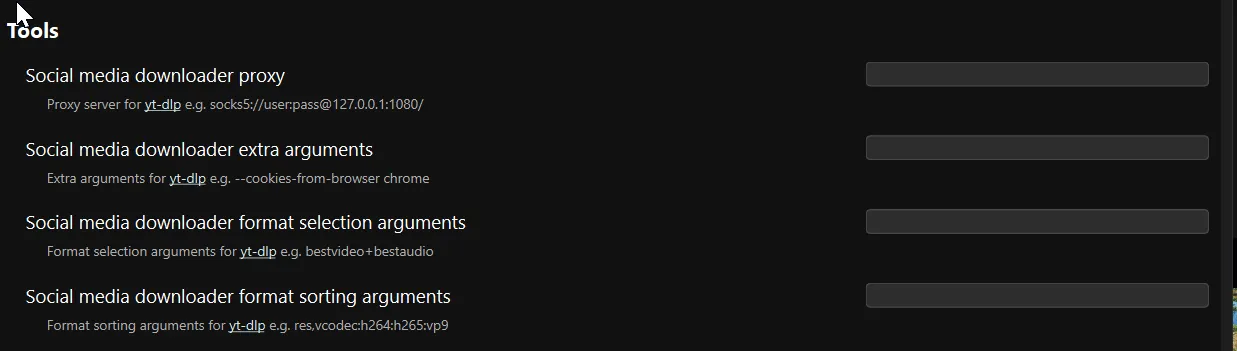
More flexible interface controls
Section titled “More flexible interface controls”New options give you better control over your workspace:
- Keep the top toolbar visible in frameless mode.
- Show or hide the toolbar entirely (Shift).
- Automatically show or hide the title bar on Windows.
Touchpad panning and zooming
Section titled “Touchpad panning and zooming”Navigate your boards more naturally using touchpad gestures.
Video workflow improvements
Section titled “Video workflow improvements”- A tool to downscale videos directly inside FrameRef.
- Option to allow only one video to play at a time.
Improved project discovery
Section titled “Improved project discovery”The homepage now shows projects from any location, making it easier to access all known projects.
Multi-PC workflow support (experimental)
Section titled “Multi-PC workflow support (experimental)”You can now store your boards on OneDrive/Dropbox/G-Drive and open them on any PC to continue working.
Improvements
Section titled “Improvements”Updated user interface
Section titled “Updated user interface”The UI has been further refined to improve clarity and consistency across the application.
Faster PDF page selector loading
Section titled “Faster PDF page selector loading”Improved performance when browsing large or multi-page PDFs.
Use system cursors
Section titled “Use system cursors”Replaced custom cursors with system cursors for platform consistency.
Updated core dependencies
Section titled “Updated core dependencies”Updated ffmpeg, yt-dlp, and Deno to their latest versions for better reliability and compatibility.
Automatic preferences saving
Section titled “Automatic preferences saving”Preferences are now automatically saved when closing the preferences window.
Bug fixes
Section titled “Bug fixes”Fixed cropping for videos and GIFs
Section titled “Fixed cropping for videos and GIFs”Resolved issues affecting cropping behavior for video and GIF items.
Improved stability and memory usage
Section titled “Improved stability and memory usage”Fixed crashes and memory-related issues to improve overall reliability.
Fixed Social Media Downloader metadata
Section titled “Fixed Social Media Downloader metadata”Resolved an issue where source URLs were not saved for downloaded videos.
Improved file import behavior
Section titled “Improved file import behavior”- Fixed issues when dropping the same local file multiple times.
- Improved handling of duplicate file imports.
Open boards via double-click
Section titled “Open boards via double-click”You can now open board files directly by double-clicking them.