
The Items tab controls default item behavior and the long-jump step used by the playback controls.
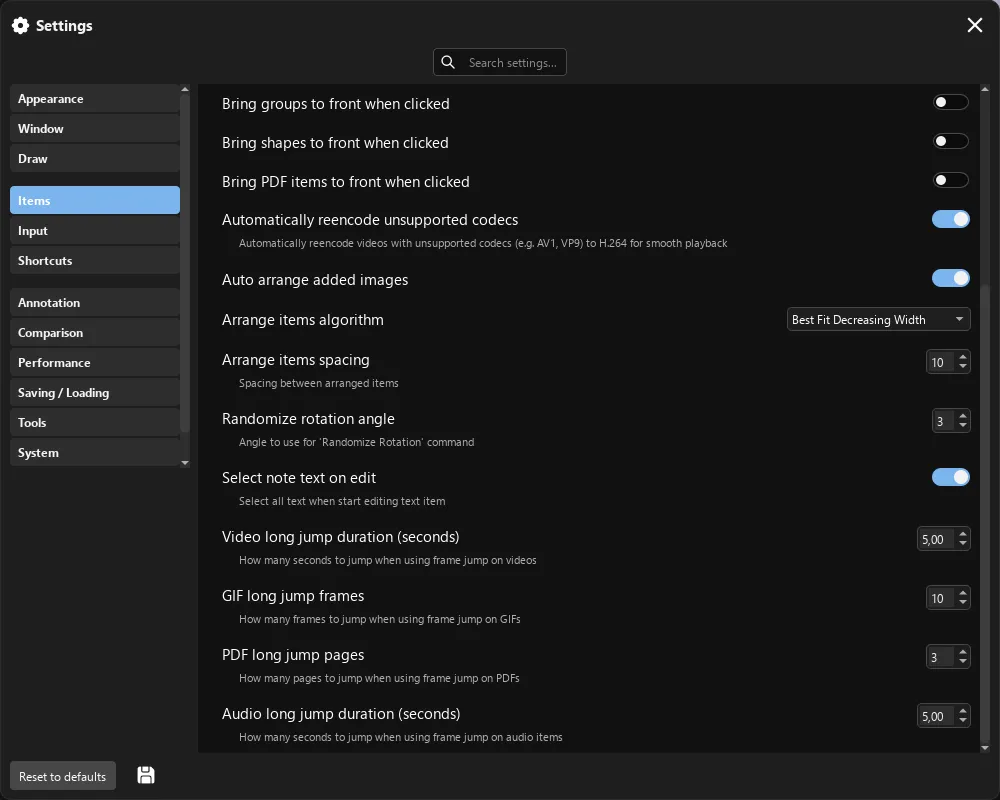
Bring to front
Section titled “Bring to front”These toggles decide which item types come to the front when you click them on the canvas. All are off by default, matching the behavior described in Layers & depth.
| Setting |
|---|
| Bring images to front when clicked |
| Bring videos to front when clicked |
| Bring text to front when clicked |
| Bring GIFs to front when clicked |
| Bring lines to front when clicked |
| Bring SVG items to front when clicked |
| Bring groups to front when clicked |
| Bring shapes to front when clicked |
| Bring PDF items to front when clicked |
Video & media
Section titled “Video & media”| Setting | Values | Default | Description |
|---|---|---|---|
| Automatically reencode unsupported codecs | On / Off | On | Re-encode videos that use codecs FrameRef cannot play smoothly. |
| Auto arrange added images | On / Off | On | Automatically arrange images when they are added to the board. |
| Arrange items algorithm | BFDH, BFDW, Maximal Empty Rectangles, Addition date, File creation date, File modification date, File name | Best Fit Decreasing Width | Algorithm used by the Arrange action and auto-arrange. |
| Arrange items spacing | 0–200 | 10 | Spacing inserted between items during arrangement. |
| Randomize rotation angle | 1–90 | 3 | Maximum random rotation applied by Randomize Rotation. |
| Select note text on edit | On / Off | On | Select all note text when opening the note editor. |
Long jumps
Section titled “Long jumps”The jump-back / jump-forward playback controls use a step that depends on the media type. Set how far each type jumps.
| Setting | Values | Default | Description |
|---|---|---|---|
| Video long jump duration (seconds) | 0.5–30 | 5 | How many seconds to jump on videos. |
| GIF long jump frames | 1–100 | 10 | How many frames to jump on GIFs. |
| PDF long jump pages | 1–100 | 3 | How many pages to jump on PDFs. |
| Audio long jump duration (seconds) | 0.5–30 | 5 | How many seconds to jump on audio items. |
Next steps
Section titled “Next steps”InputConfigure pan, zoom, snapping, and tablet controls.
PerformanceControl image scaling and sampling.