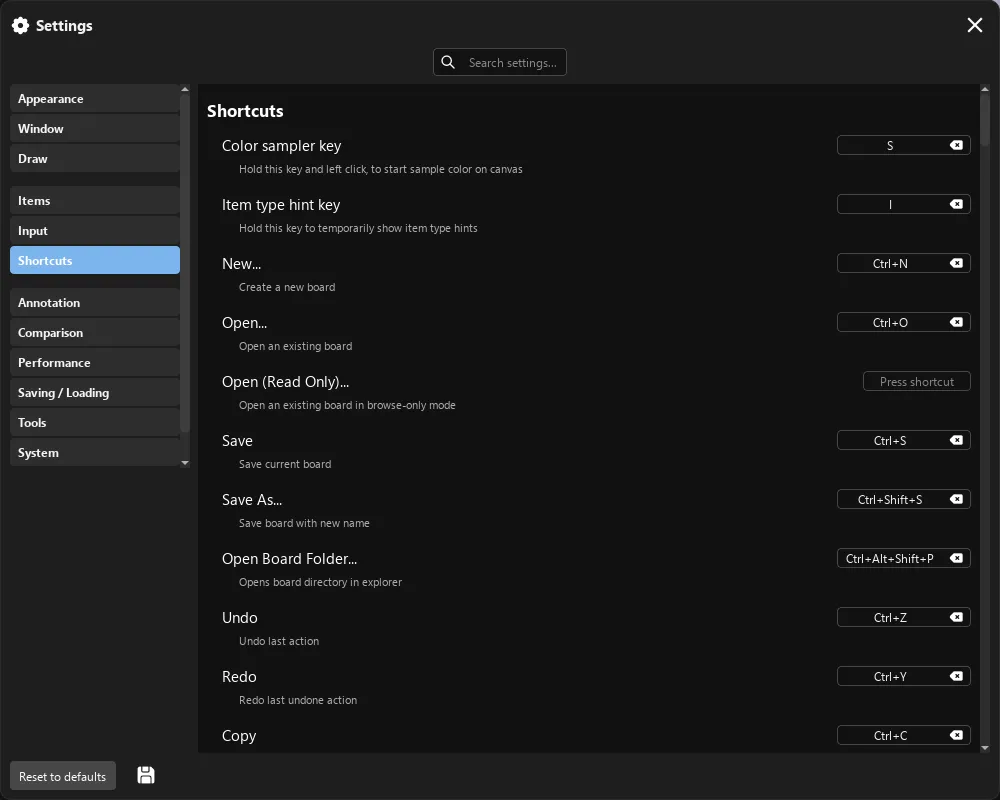
The Shortcuts tab lists every rebindable action in FrameRef. Use the search field at the top of Preferences to find a specific action quickly.
These two keys have their own settings at the top of the tab:
Setting
Default
Description
Color sampler key SHold this key and click to sample a color from anywhere.
Item type hint key IHold this key to display item types on the canvas.
The customizable toolbar (hotbar) has ten slots, labelled Hotbar slot 1 through Hotbar slot 9 and Hotbar slot 0 . Their default keys are 1 –9 and 0 . Right-click the toolbar and choose Customize hotbar to change which actions fill the slots.
Click an action’s shortcut field and press the new key or combination. Actions with no shortcut show an empty field.
Clear a field to disable that shortcut.
If a new shortcut conflicts with another action, FrameRef warns you inline and lets you resolve the conflict from the popup, so creating conflicting shortcuts is no longer possible.
Right-click a category or an individual setting to Reset it. Use Reset to defaults at the bottom-left to reset everything.
The Annotation and Comparison tabs are separate shortcut categories. They only conflict with shortcuts inside their own window, so you can safely reuse keys such as V , ← , and → .
Action
Shortcut
New / Open / Save / Save As
Ctrl + N / O / S / Ctrl + Shift + S
Open Board Folder
Ctrl + Alt + Shift + P
Recent boards
Shift + Alt + 1 …9
Go to homepage
Ctrl + Home
Undo / Redo
Ctrl + Z / Ctrl + Shift + Z
Copy / Cut / Paste
Ctrl + C / X / V
Delete
Delete
Delete with File
Shift + Delete
Preferences
Ctrl + P (Windows)
Action
Shortcut
Line
L
Text
N
Drawing
D
Rectangle / Circle
Ctrl + Shift + Alt + 1 / 2
Color Swatch
Ctrl + Shift + Alt + S
Portal
P
Action
Shortcut
Select All / Deselect All
Ctrl + A / A
Frame Selection
F
Group / Ungroup
Ctrl + G / Shift + G
Bring to front / Put to back
] / [
Toggle grayscale
Alt + G
Align left / right / top / bottom
Shift + A / D / W / S
Align centers / distribute
Shift + X / Y / Q / E
Arrange alternatives
Shift + 2 …8
Action
Shortcut
Flip horizontal / vertical
Shift + H / V
Reset local pan zoom
Ctrl + R
Reset rotation / transform / crop, Resize to source
R then R / T / C / S
Randomize rotation
Ctrl + Alt + R
Normalize size / by height / by width
Ctrl + Alt + A / H / W
Action
Shortcut
Toggle play / pause
V
Previous / next frame
← / →
Go to start / end
Ctrl + ← / →
Jump back / forward 10 frames
Alt + ← / →
Mute / volume
M / ↑ / ↓
Find
Ctrl + F
Crop / Reset crop
C / R then C
Extract frame
Ctrl + Shift + E
Annotate
Ctrl + Alt + N
Extract / Copy selection as image
Ctrl + Shift + I / Ctrl + Shift + C
Export selection to folder
Ctrl + Alt + E
Trim selected item
Ctrl + Alt + T
Resize selected video
Shift + Alt + R
Extract palette
Ctrl + Alt + P
Cleanup
Ctrl + Shift + Alt + C
Action
Shortcut
Always on top / Toggle frameless
Ctrl + Shift + A / F
Toggle top bar
Tab
Increase / decrease opacity
Ctrl + Shift + ↑ / ↓
You can also assign a shortcut to any shortcut-less action such as Compare… , Apply Composition Overlay… , Pack Board… , or Open Item Web URL .